Chapter 13 Miscellanea
Tools like sort, head and tail, grep, awk, and sed represent a powerful toolbox, particularly when used with the standard input and standard output streams. There are many other useful command line utilities, and we’ll cover a few more, but we needn’t spend quite as much time with them as we have for awk and sed.
Manipulating Line Breaks
All of the features of the tools we’ve covered so far assume the line as the basic unit of processing; awk processes columns within each line, sed matches and replaces patterns in each line (but not easily across lines), and so on. Unfortunately, sometimes the way data break over lines isn’t convenient for these tools. The tool tr translates sets of characters in its input to another set of characters as specified: ... | tr '<set1>' '<set2>'32
As a brief example, tr 'TA' 'AT' pz_cDNAs.fasta would translate all T characters into A characters, and vice versa (this goes for every T and A in the file, including those in header lines, so this tool wouldn’t be too useful for manipulating FASTA files). In a way, tr is like a simple sed. The major benefit is that, unlike sed, tr does not break its input into a sequence of lines that are operated on individually, but the entire input is treated as a single stream. Thus tr can replace the special “newline” characters that encode the end of each line with some other character.
On the command line, such newline characters may be represented as \n, so a file with the following three lines
line 1
line 2
line 3
could alternatively be represented as line 1\nline 2\nline 3\n (most files end with a final newline character). Supposing this file was called lines.txt, we could replace all of the \n newlines with # characters.
[oneils@mbp ~/apcb/intro/fasta_stats]$ cat lines.txt | tr '\n' '#'
line 1#line 2#line 3#oneils@mbp ~/apcb/intro/fasta_stats$
Notice in the above that even the final newline has been replaced, and our command prompt printed on the same line as the output. Similarly, tr (and sed) can replace characters with newlines, so tr '#' '\n' would undo the above.
Using tr in combination with other utilities can be helpful, particularly for formats like FASTA, where a single “record” is split across multiple lines. Suppose we want to extract all sequences from pz_cDNAs.fasta with nReads greater than 5. The strategy would be something like:
Identify a character not present in the file, perhaps an
@or tab character\t(and check withgrepto ensure it is not present before proceeding).Use
trto replace all newlines with that character, for example,tr '\n' '@'.Because
>characters are used to indicate the start of each record in FASTA files, usesedto replace record start>characters with newlines followed by those characters:sed -r 's/>/\n>/g'.At this point, the stream would look like so, where each line represents a single sequence record (with extraneous
@characters inserted):>PZ7180000027934 nReads=5 cov=2.32231@TTTAATGATCAGTAAAGTTATAGTAGTTGTATGTACAATATT >PZ456916 nReads=1 cov=1@AAACTGTCTCTAATTAATTTATAAAATTTAATTTTTTAGTAAAAAAGCTAAAATA >PZ7180000037718 nReads=9 cov=6.26448@ACTTTTTTTTTAATTTATTTAATTATATTAACTAATAAATCC >PZ7180000000004_TY nReads=86 cov=36.4238@CCAAAGTCAACCATGGCGGCCGGGGTACTTTATACTTAUse
grep,sed,awk, and so on to select or modify just those lines of interest. (If needed, we could also usesedto remove the inserted@characters so that we can process on the sequence itself.) For our example, usesed -r 's/=/ /1' | awk '{if($3 > 5) {print $0}}'to print only lines where the nReads is greater than 5.Reformat the file back to FASTA by replacing the
@characters for newlines, withtrorsed.The resulting stream will have extra blank lines as a result of the extra newlines inserted before each > character. These can be removed in a variety of ways, including
awk '{if(NF > 0) print $0}'.
Joining Files on a Common Column (and Related Row/Column Tasks)
Often, the information we want to work with is stored in separate files that share a common column. Consider the result of using blastx to identify top HSPs against the yeast open reading frame set, for example.
[oneils@mbp ~/apcb/intro/fasta_stats]$ blastx -query pz_cDNAs.fasta \
> -subject ../blast/orf_trans.fasta \
> -evalue 1e-6 \
> -max_target_seqs 1 \
> -max_hsps 1 \
> -outfmt 6 \
> -out pz_blastx_yeast_top1.txt
The resulting file pz_blastx_yeast_top1.txt contains the standard BLAST information:
PZ7180000000004_TY      YKL081W 31.065  338     197     8       13      993     1       313     4.46e->
PZ1082_AB       YHR104W 44.915  118     62      3       4       348     196     313     2.90e-27      >
PZ11_FX YLR406C 53.012  83      38      1       290     42      25      106     1.42e-19        65.9
PZ7180000036154 YNL245C 36.275  102     60      3       105     395     1       102     3.46e-07      >
PZ605962        YKR079C 29.565  115     66      4       429     121     479     590     1.13e-11      >
PZ856513        YKL215C 48.387  155     73      3       3       452     109     261     2.90e-38
...
Similarly, we can save a table of sequence information from the fasta_stats.py program with the comment lines removed as pz_stats.table.
[oneils@mbp ~/apcb/intro/fasta_stats]$ ./fasta_stats.py pz_cDNAs.fasta | \
> grep -v '#' > pz_stats.table
Viewing the file with less -S:
PZ7180000000004_TX  0.279   1000    AAATA   12    unit:TAA        12      trinucleotide
PZ7180000031590     0.379   486     ACAAA   5     unit:ATTTA      10      pentanucleotide
PZ7180000027934     0.379   937     ATTTT   7     unit:GTTTGAC    14      heptanucleotide
PZ456916            0.167   162     TAATT   6     unit:TAAT       8       tetranucleotide
PZ7180000037718     0.299   518     TTTTT   15    unit:GTTGT      10      pentanucleotide
PZ7180000000004_TY  0.578   998     AGAAG   8     unit:GCGAG      10      pentanucleotide
...
Given such data, we might wish to ask which sequences had a hit to a yeast open reading frame and a GC content of over 50%. We could easily find out with awk, but first we need to invoke join, which merges two row/column text files based on lines with similar values in a specified “key” column. By default, join only outputs rows where data are present in both files. Both input files are required to be similarly sorted (either ascending or descending) on the key columns: join -1 <key column in file1> -2 <key column in file2> <file1> <file2>.
Like most tools, join outputs its result to standard output, which can be redirected to a file or other tools like less and awk. Ideally, we’d like to say join -1 1 -2 1 pz_stats.table pz_blastx_yeast_top1.txt to indicate that we wish to join these files by their common first column, but as of yet the files are not similarly sorted. So, we’ll first create sorted versions.
[oneils@mbp ~/apcb/intro/fasta_stats$ ~/apcb/intro/fasta_stats]$ cat pz_stats.table | \
> sort -k1,1d > pz_stats.sorted.txt
[oneils@mbp ~/apcb/intro/fasta_stats]$ cat pz_blastx_yeast_top1.txt | \
> sort -k1,1d > pz_blastx_yeast_top1.sorted.txt
Now we can run our join -1 1 -2 1 pz_stats.sorted.txt pz_blastx_yeast_top1.sorted.txt, piping the result into less. The output contains all of the columns for the first file, followed by all of the columns of the second file (without the key column), separated by single spaces.
PZ1082_AB 0.405 373 TTTGC 4 unit:GCA 6 trinucleotide YHR104W 44.915 118 62 3 4 348 19
PZ11_FX 0.435 400 CATCA 4 unit:CAT 9 trinucleotide YLR406C 53.012 83 38 1 290 42 25 1
PZ3202_E 0.464 496 AGAGT 5 unit:TGGC 8 tetranucleotide YBR247C 64.000 25 9 0 344 418
PZ488295 0.666 428 CGCGC 9 unit:GC 10 dinucleotide YIL106W 35.000 140 87 3 410 3 93 2
PZ545_OM 0.372 495 AAGAA 8 unit:GAAGAT 12 hexanucleotide YPL131W 43.750 64 31 1 201 3
PZ605962 0.49 429 TCTGT 4 unit:TGC 6 trinucleotide YKR079C 29.565 115 66 4 429 121 47
...
Instead of viewing the output with less, piping it into an awk '{if($1 > 0.5) print $1}' would quickly identify those sequences with BLAST matches and GC content over 50%.
One difficulty with the above output is that it is quite hard to read, at least for us humans. The same complaint could be made for most files that are separated by tab characters; because of the way tabs are formatted in less and similar tools, different-length entries can cause columns to be misaligned (only visually, of course). The column utility helps in some cases. It reformats whitespace-separated row/column input so that the output is human readable, by replacing one or more spaces and tabs by an appropriate number of spaces so that columns are visually aligned: column -t <file> or ... | column -t.
By now, it should be no surprise that column writes its output to standard output. Here’s the result of join -1 1 -2 1 pz_stats.sorted.txt pz_blastx_yeast_top1.sorted.txt | column -t | less -S, which contains the same data as above, but with spaces used to pad out the columns appropriately.
PZ1082_AB            0.405  373   TTTGC  4   unit:GCA     6   trinucleotide    YHR104
PZ11_FX              0.435  400   CATCA  4   unit:CAT     9   trinucleotide    YLR406
PZ3202_E             0.464  496   AGAGT  5   unit:TGGC    8   tetranucleotide  YBR247
PZ488295             0.666  428   CGCGC  9   unit:GC      10  dinucleotide     YIL106
PZ545_OM             0.372  495   AAGAA  8   unit:GAAGAT  12  hexanucleotide   YPL131
PZ605962             0.49   429   TCTGT  4   unit:TGC     6   trinucleotide    YKR079
...
Because most tools like awk and sort use any number of whitespace characters as column delimiters, they can also be used on data post-column.
There are several important caveats when using join. First, if any entries in the key columns are repeated, the output will contain a row for each matching pair of keys.
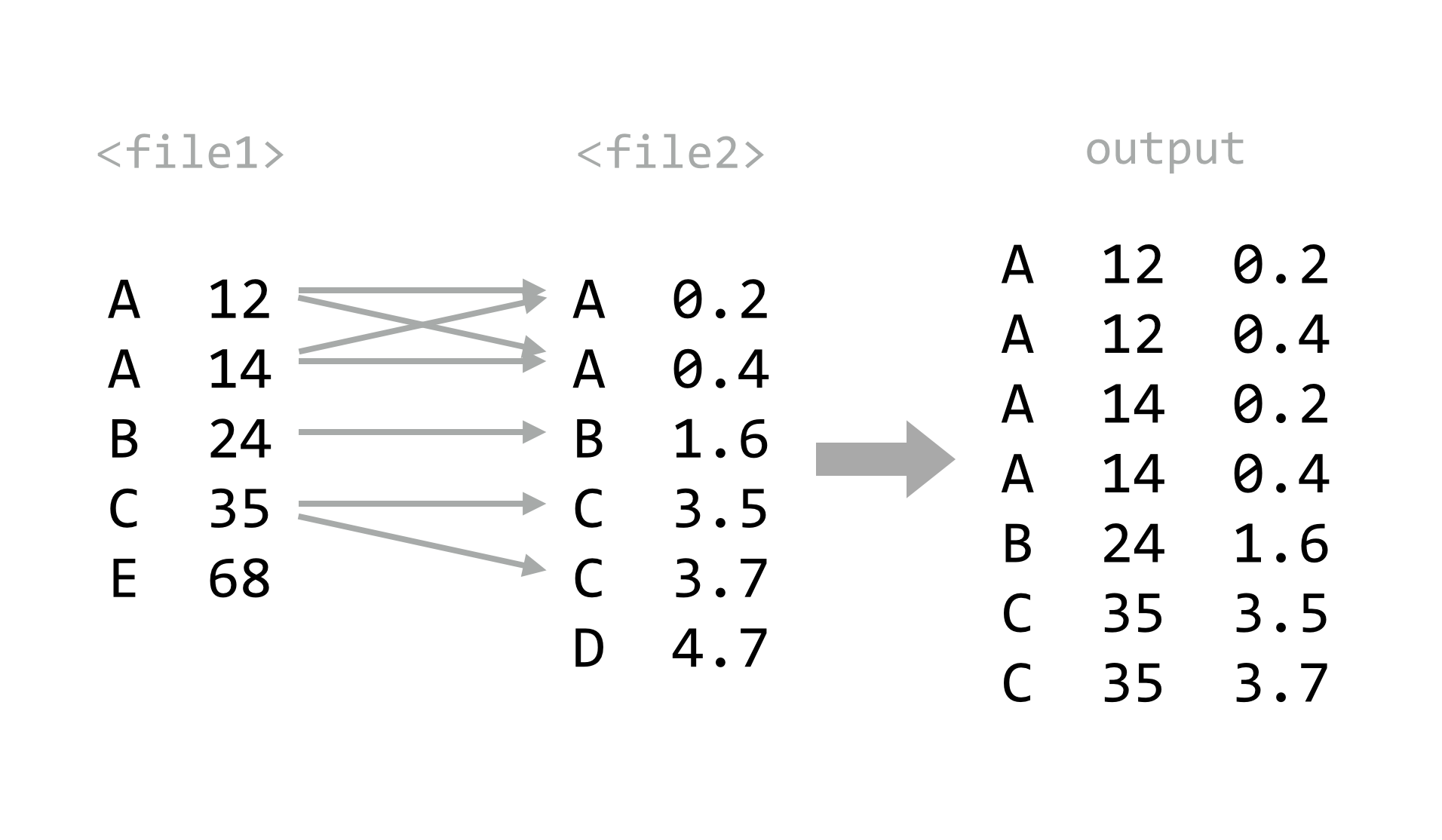
Second, the files must be similarly sorted — if they are not, join will at best produce a difficult-to-see warning. A useful trick when using bash-compatible shells is to make use of the features for “process substitution”. Basically, any command that prints to standard output may be wrapped in <( and ) and used in place of a file name — the shell will automatically create a temporary file with the contents of the command’s standard output, and replace the construct with the temporary file name. This example joins the two files as above, without separate sorting steps: join -1 1 -2 1 <(sort -k1,1d pz_stats.table) <(sort -k1,1d pz_blastx_yeast_top1.txt). Because the pz_stats.table file was the result of redirecting standard output from ./fasta_stats.py pz_cDNAs.txt through grep -v '#', we could equivalently say join -1 1 -2 1 <(./fasta_stats.py pz_cDNAs.fasta | grep -v '#' | sort -k1,1d) <(sort -k1,1d pz_blastx_yeast_top1.txt).
Finally, unless we are willing to supply an inordinate number of arguments, the default for join is to produce only lines where the key information is found in both files. More often, we might wish for all keys to be included, with “missing” values (e.g., NA) assumed for data present in only one file. In database parlance, these operations are known as an “inner join” and “full outer join” (or simply “outer join”), respectively.

Where join does not easily produce outer joins, more sophisticated tools can do this and much more. For example, the Python and R programming languages (covered in later chapters) excel at manipulating and merging collections of tabular data. Other tools utilize a specialized language for database manipulation known as Structured Query Language, or SQL. Such databases are often stored in a binary format, and these are queried with software like MySQL and Postgres (both require administrator access to manage), or simpler engines like sqlite3 (which can be installed and managed by normal users).33
Counting Duplicate Lines
We saw that sort with the -u flag can be used to remove duplicates (defined by the key columns used). What about isolating duplicates, or otherwise counting or identifying them? Sadly, sort isn’t up to the task, but a tool called uniq can help. It collapses consecutive, identical lines. If the -c flag is used, it prepends each line with the number of lines collapsed: uniq <file> or ... | uniq.
Because uniq considers entire lines in its comparisons, it is somewhat more rigid than sort -u; there is no way to specify that only certain columns should be used in the comparison.34 The uniq utility will also only collapse identical lines if they are consecutive, meaning the input should already be sorted (unless the goal really is to merge only already-consecutive duplicate lines). Thus, to identify duplicates, the strategy is usually:
- Extract columns of interest using
awk. - Sort the result using
sort. - Use
uniq -cto count duplicates in the resulting lines.
Let’s again consider the output of ./fasta_stats.py pz_cDNAs.fasta, where column 4 lists the most common 5-mer for each sequence. Using this extract/sort/uniq pattern, we can quickly identify how many times each 5-mer was listed. We’ll also use the tool cut to extract the 4th column (we could also choose to use awk '{print $4}').
[oneils@mbp ~/apcb/intro/fasta_stats]$ ./fasta_stats.py pz_cDNAs.fasta | \
> grep -v '#' | \
> cut -f 4 | \
> sort | \
> uniq -c | \
> less -S
The result lists the counts for each 5-mer. We could continue by sorting the output by the new first column to identify the 5-mers with the largest counts.
     45 AAAAA
      1 AAAAG
      8 AAAAT
     18 AAATA
      1 AAATG
      4 AAATT
...
It is often useful to run uniq -c on lists of counts produced by uniq -c. Running the result above through awk '{print $1}' | sort -n | uniq -c reveals that 88 5-mers are listed once, 14 are listed twice, and so on.
     88 1
     14 2
      8 3
      2 4
      3 5
      3 6
...
Counting items with uniq -c is a powerful technique for “sanity checking” data. If we wish to check that a given column or combination of columns has no duplicated entries, for example, we could apply the extract/sort/uniq strategy followed by awk '{if($1 > 1) print $0}'. Similarly, if we want to ensure that all rows of a table have the same number of columns, we could run the data through awk '{print NF}' to print the number of columns in each row and then apply extract/sort/uniq, expecting all column counts to be collapsed into a single entry.
For-Loops in bash
Sometimes we want to run the same command or similar commands as a set. For example, we may have a directory full of files ending in .tmp, but we wished they ended in .txt.
[oneils@mbp ~/apcb/intro/temp]$ ls
file10.tmp  file13.tmp  file16.tmp  file19.tmp  file2.tmp  file5.tmp  file8.tmp
file11.tmp  file14.tmp  file17.tmp  file1.tmp   file3.tmp  file6.tmp  file9.tmp
file12.tmp  file15.tmp  file18.tmp  file20.tmp  file4.tmp  file7.tmp
Because of the way command line wildcards work, we can’t use a command like mv *.tmp *.txt; the *.tmp would expand into a list of all the files, and *.txt would expand into nothing (as it matches no existing file names).
Fortunately, bash provides a looping construct, where elements reported by commands (like ls *.tmp) are associated with a variable (like $i), and other commands (like mv $i $i.txt) are executed for each element.
[oneils@mbp ~/apcb/intro/temp$ for i in $(ls *.tmp); do mv $i ]$i.txt; done
[oneils@mbp ~/apcb/intro/temp]$ ls
file10.tmp.txt  file14.tmp.txt  file18.tmp.txt  file2.tmp.txt  file6.tmp.txt
file11.tmp.txt  file15.tmp.txt  file19.tmp.txt  file3.tmp.txt  file7.tmp.txt
file12.tmp.txt  file16.tmp.txt  file1.tmp.txt   file4.tmp.txt  file8.tmp.txt
file13.tmp.txt  file17.tmp.txt  file20.tmp.txt  file5.tmp.txt  file9.tmp.txt
It’s more common to see such loops in executable scripts, with the control structure broken over several lines.
#!/bin/bash

for i in $(ls *.tmp); do
    mv $i $i.txt;
done
This solution works, though often looping and similar programming techniques (like if-statements) in bash become cumbersome, and using a more robust language like Python may be the better choice. Nevertheless, bash does have one more interesting trick up its sleeve: the bash shell can read data on standard input, and when doing so attempts to execute each line. So, rather than using an explicit for-loop, we can use tools like awk and sed to “build” commands as lines. Let’s remove the .tmp from the middle of the files by building mv commands on the basis of a starting input of ls -1 *.tmp* (which lists all the files matching *.tmp* in a single column). First, we’ll build the structure of the commands.
[oneils@mbp ~/apcb/intro/temp]$ ls -1 *.tmp* | \
> awk '{print "mv "$1" "$1}'
mv file10.tmp.txt file10.tmp.txt
mv file11.tmp.txt file11.tmp.txt
mv file12.tmp.txt file12.tmp.txt
...
To this we will add a sed -r s/\.tmp//2 to replace the second instance of .tmp with nothing (remembering to escape the period in the regular expression), resulting in lines like
mv file10.tmp.txt file10.txt
mv file11.tmp.txt file11.txt
mv file12.tmp.txt file12.txt
...
After the sed, we’ll pipe this list of commands to bash, and our goal is accomplished.
[oneils@mbp ~/apcb/intro/temp]$ ls -1 *.tmp.* | \
> awk '{print "mv "$1" "$1}' | \
> sed -r 's/\.tmp//2' | \
> bash
[oneils@mbp ~/apcb/intro/temp]$ ls
file10.txt  file13.txt  file16.txt  file19.txt  file2.txt  file5.txt  file8.txt
file11.txt  file14.txt  file17.txt  file1.txt   file3.txt  file6.txt  file9.txt
file12.txt  file15.txt  file18.txt  file20.txt  file4.txt  file7.txt
Exercises
In the file
pz_cDNAs.fasta, sequence IDs are grouped according to common suffixes like_TY,_ACT, and the like. Which group has the largest number of sequences, and how many are in that group?Using the various command line tools, extract all sequences composed of only one read (
nReads=1) frompz_cDNAs.fastato a FASTA formatted file calledpz_cDNAs_singles.fasta.In the annotation file
PZ.annot.txt, each sequence ID may be associated with multiple gene ontology (GO) “numbers” (column 2) and a number of different “terms” (column 3). Many IDs are associated with multiple GO numbers, and there is nothing to stop a particular number or term from being associated with multiple IDs.... PZ7180000023260_APN GO:0005515 btb poz domain containing protein PZ7180000035568_APN GO:0005515 btb poz domain containing protein PZ7180000020052_APQ GO:0055114 isocitrate dehydrogenase (nad+) PZ7180000020052_APQ GO:0006099 isocitrate dehydrogenase (nad+) PZ7180000020052_APQ GO:0004449 isocitrate dehydrogenase (nad+) ...Which GO number is associated with largest number of unique IDs? How many different IDs is it associated with? Next, answer the same questions using the GO term instead of GO number. For the latter, beware that the column separators in this file are tab characters (
\t) butawkby default uses any whitespace, including the spaces found in the terms column. In this file, though,isocitrateis not a term, butisocitrate dehydrogenase (nad+)is.
Unlike other tools,
trcan only read its input from stdin.↩︎While binary databases such as those used by
sqlite3and Postgres have their place (especially when large tables need to be joined or searched), storing data in simple text files makes for easy access and manipulation. A discussion of SQL syntax and relational databases is beyond the scope of this book; see Jay Kreibich’s Using SQLite (Sebastopol, CA: O’Reilly Media, Inc., 2010) for a friendly introduction tosqlite3and its syntax.↩︎This isn’t quite true: the
-f <n>flag for uniq removes the first<n>fields before performing the comparison.↩︎